 T3 Smart App · Documentation
Two-way audio & night vision
Use live viewing features the right way.
Live HD camera view
1080P live video with PTZ control, two-way audio, night vision and motion tracking.
How to use the app
Once the device has been added to the T3 Smart App, you can use the camera functions through the application. Tap PTZ Camera to open the control screen.
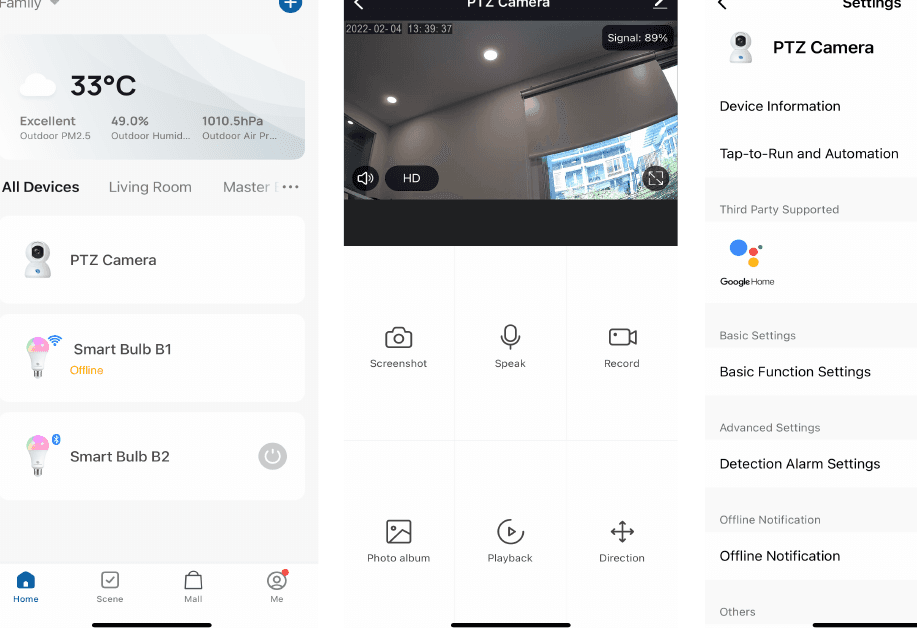
From the control screen you can:
 Tap to take a screenshot
 Tap to turn the microphone on/off to speak
 Tap to record video
 Tap to open the photo album
 Tap to view playback video
 Tap to control the direction
To configure the camera, tap the pen icon in the top-right corner:
-
Basic function settings, including flip screen and talk mode
-
Detection alarm settings, including motion detection alarm, motion tracking and schedule
-
Offline notification settings